The View — from Dalal & Co.

Everything you own, on one private screen.

Your companies, property, investments, documents and the people who depend on you — in one system that only you can open. We build it with you. It is running in days.

AED 2,599a year
AED 159an hour to set up
Start your system Tell us what you run. We quote the setup hours first.

What is it, plainly?

If you run more than one thing, the full picture of it does not exist anywhere. It is spread across two banks, an accountant’s spreadsheet, a folder of PDFs, a broker app, and your own memory. Nobody can see all of it at once — including you.

The View is a private system that holds all of it in one place: what you own, what you owe, what expires, and what is waiting on your decision. It goes as deep as your affairs do — but you start from one page that tells you what needs you today, instead of opening eight apps to find out.

It is yours alone. Not a shared app with your figures in someone else’s pool — your own system, on your own database, that we set up with you.

Who it is for

People who run more than one thing. Two or more companies, or a company plus property, or the whole picture living in your head and one spreadsheet only you understand. If you have one salary and one bank account, you do not need this — and we will tell you so rather than take your money.

Built in Dubai, for people whose money does not sit in one country. AED, USD and PKR side by side, property here and back home, and no bank feed to go wrong — you upload a statement and it reads it, wherever the account is.

What does it actually look like?

Eight real screens from the working system, filled with example figures for a fictional group of companies. Nothing here is a drawing, and every figure agrees with every other screen. Swipe, or use the arrows.

01 — The dashboard

Where you stand, the moment you open it.

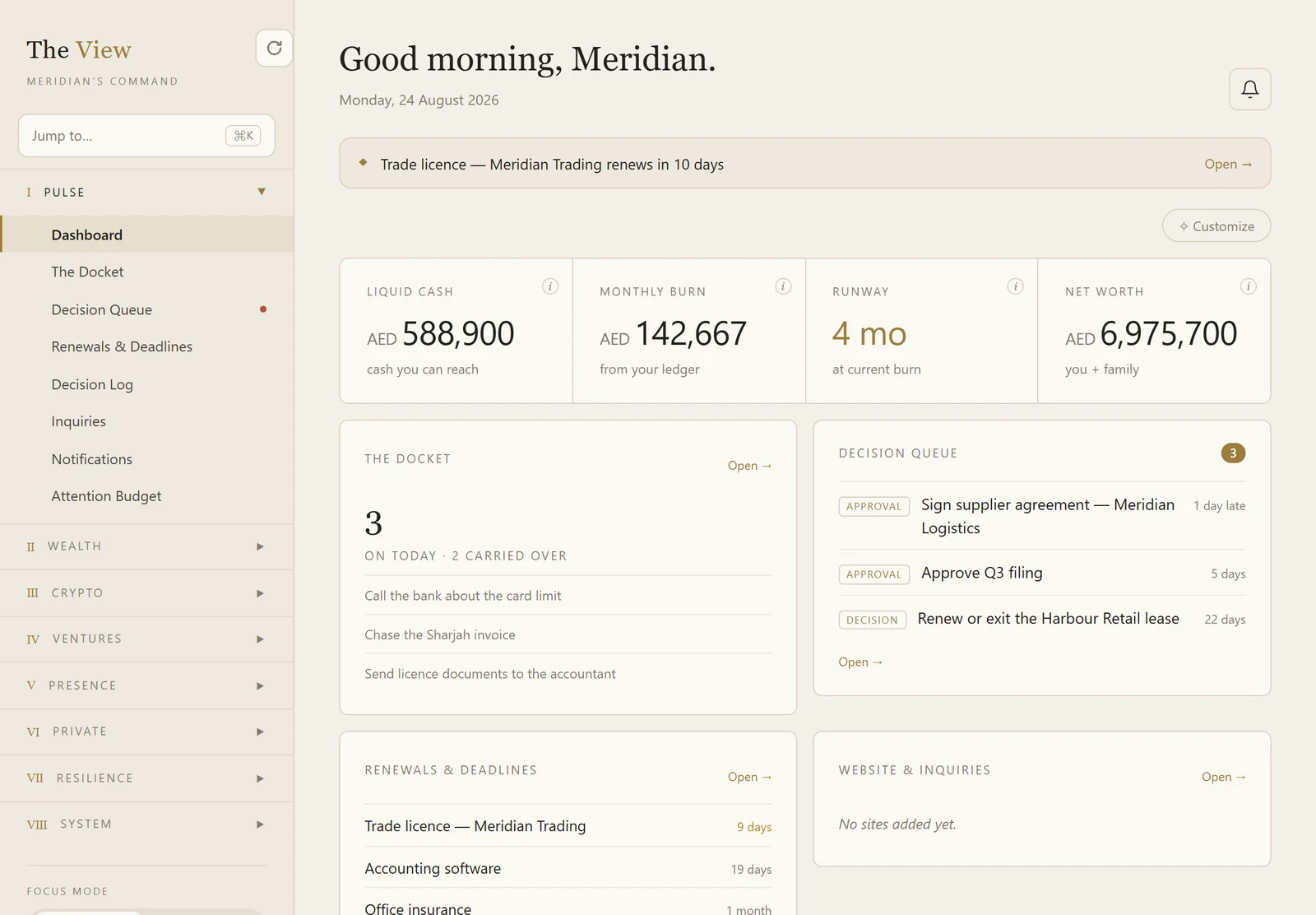
Cash you can actually reach, what you are burning a month, how long that lasts, and what is waiting on your word. The trade licence expiring in ten days is on the screen before it becomes a problem.

The View dashboard showing liquid cash, monthly burn, runway and net worth above the day’s tasks, the decision queue and the renewals feed.
Tap to enlarge
02 — Net worth

What each of you owns, and what it rests on.

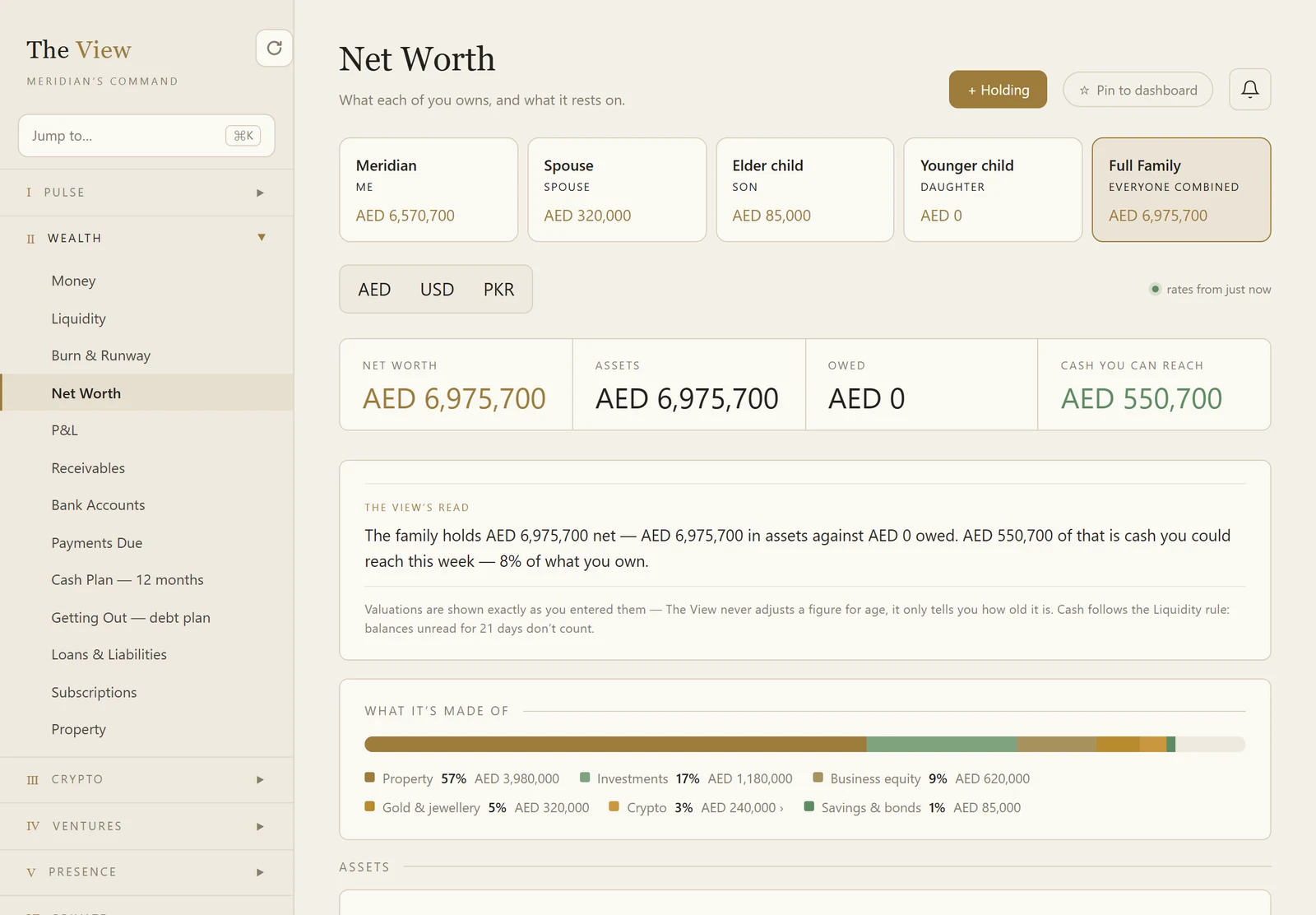
Per person and combined, in AED, USD or PKR. It shows what the total is made of — and how much of it you could actually reach this week, which on this example is eight per cent.

The View net worth screen: a figure per family member, the combined total, and a breakdown by property, investments, business equity, gold and crypto.
Tap to enlarge
03 — Property

What each asset is worth, owes, and earns.

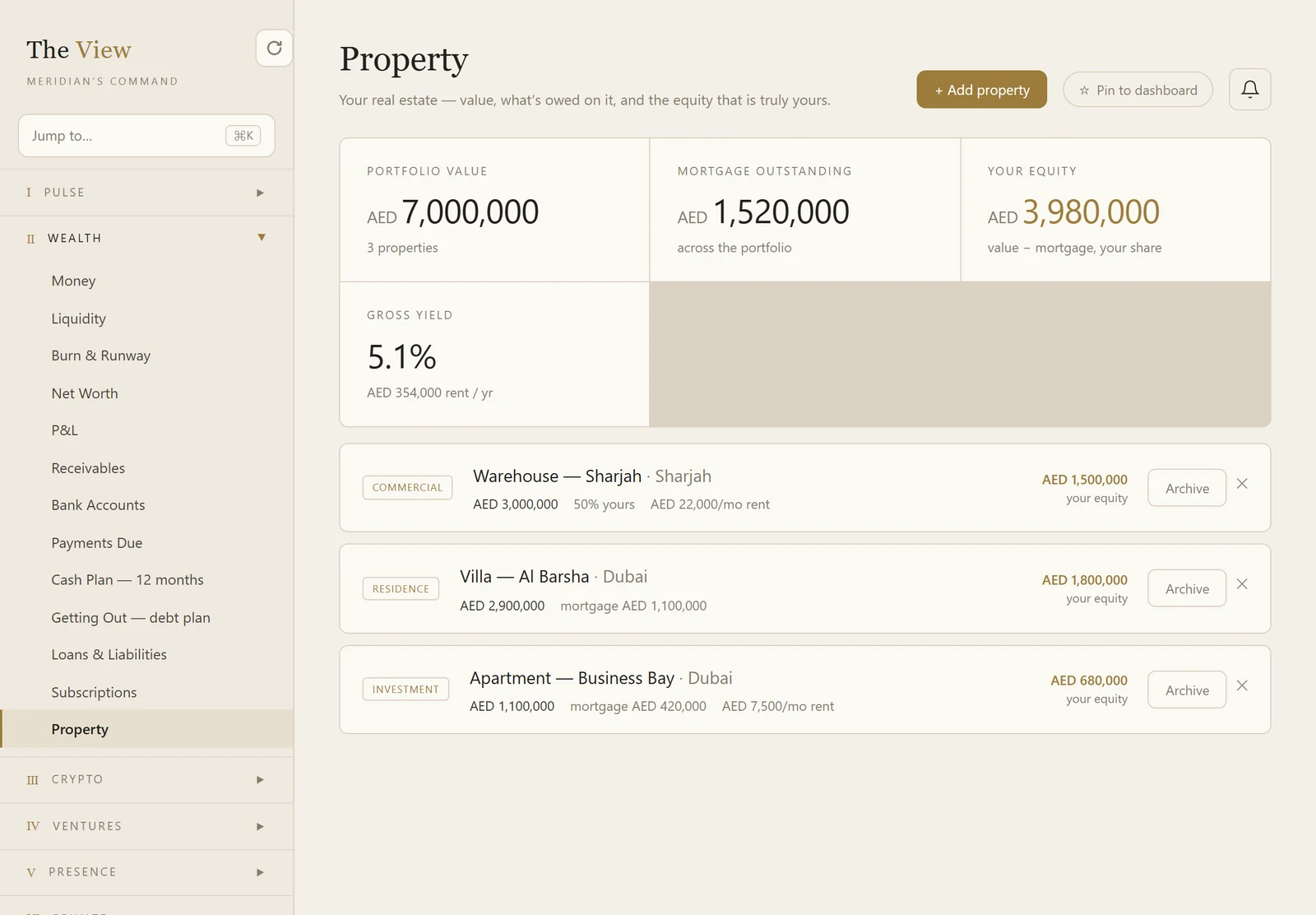
Owned and let, here and abroad, with the mortgage against each one and the equity that is truly yours. Your share of a jointly-held asset is counted as your share, not the whole of it.

The View property screen showing portfolio value, mortgage outstanding, equity and gross yield across three properties.
Tap to enlarge
04 — Decisions

The only things that actually need you.

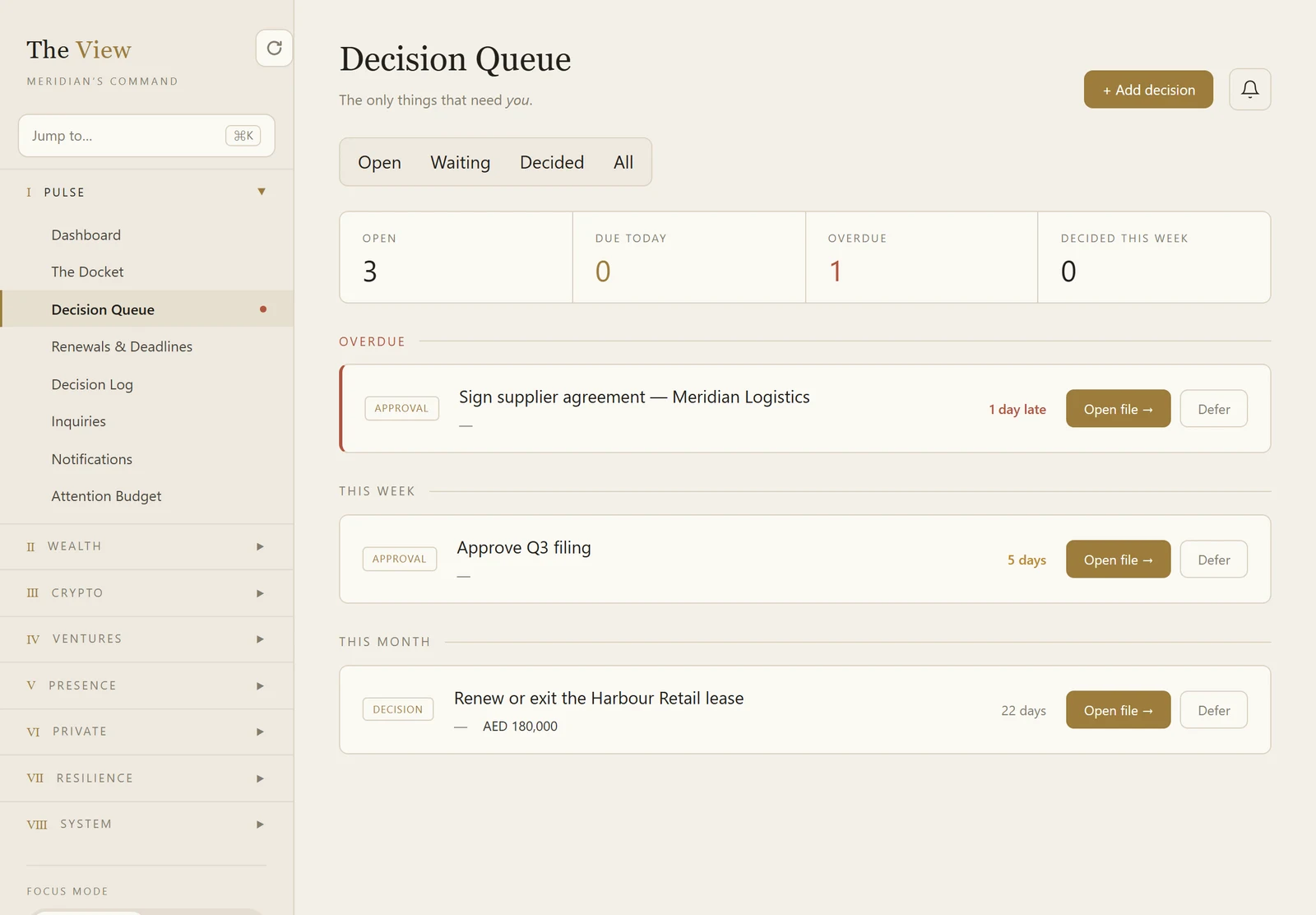
Not a to-do list — the approvals and choices nobody else can make, sorted by what is already late, what lands this week, and what is coming this month.

The View decision queue showing an overdue approval, one due this week and one due this month, each with the money attached.
Tap to enlarge
05 — Renewals

Nothing expires without warning you first.

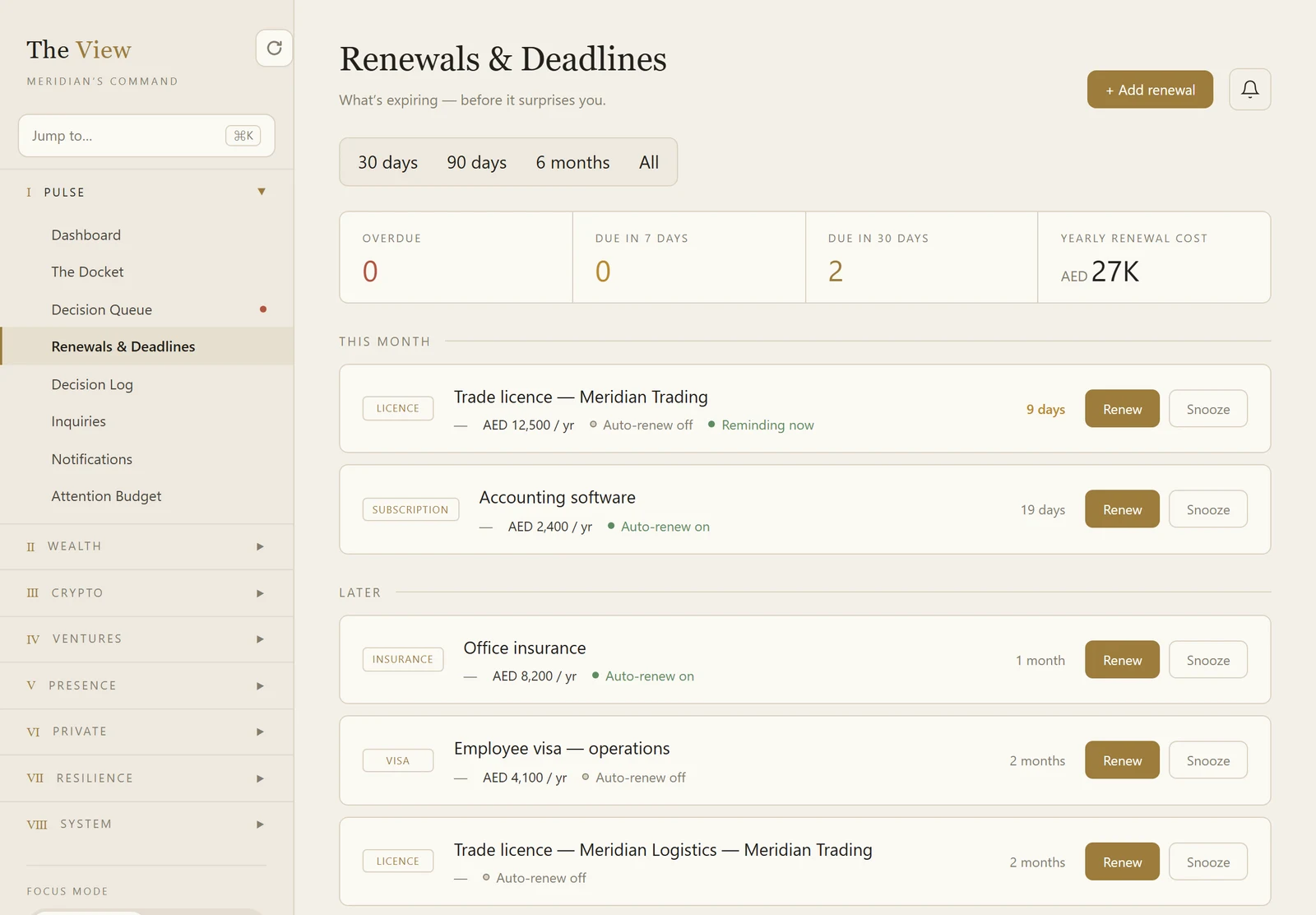
Every licence, visa, insurance and subscription counted down in one list, with what each one costs a year and whether it renews itself. Your document expiry dates fold into the same feed.

The View renewals screen showing overdue, due in seven days, due in thirty days and the total yearly renewal cost.
Tap to enlarge
06 — Travel

Whether the papers are ready, before you go.

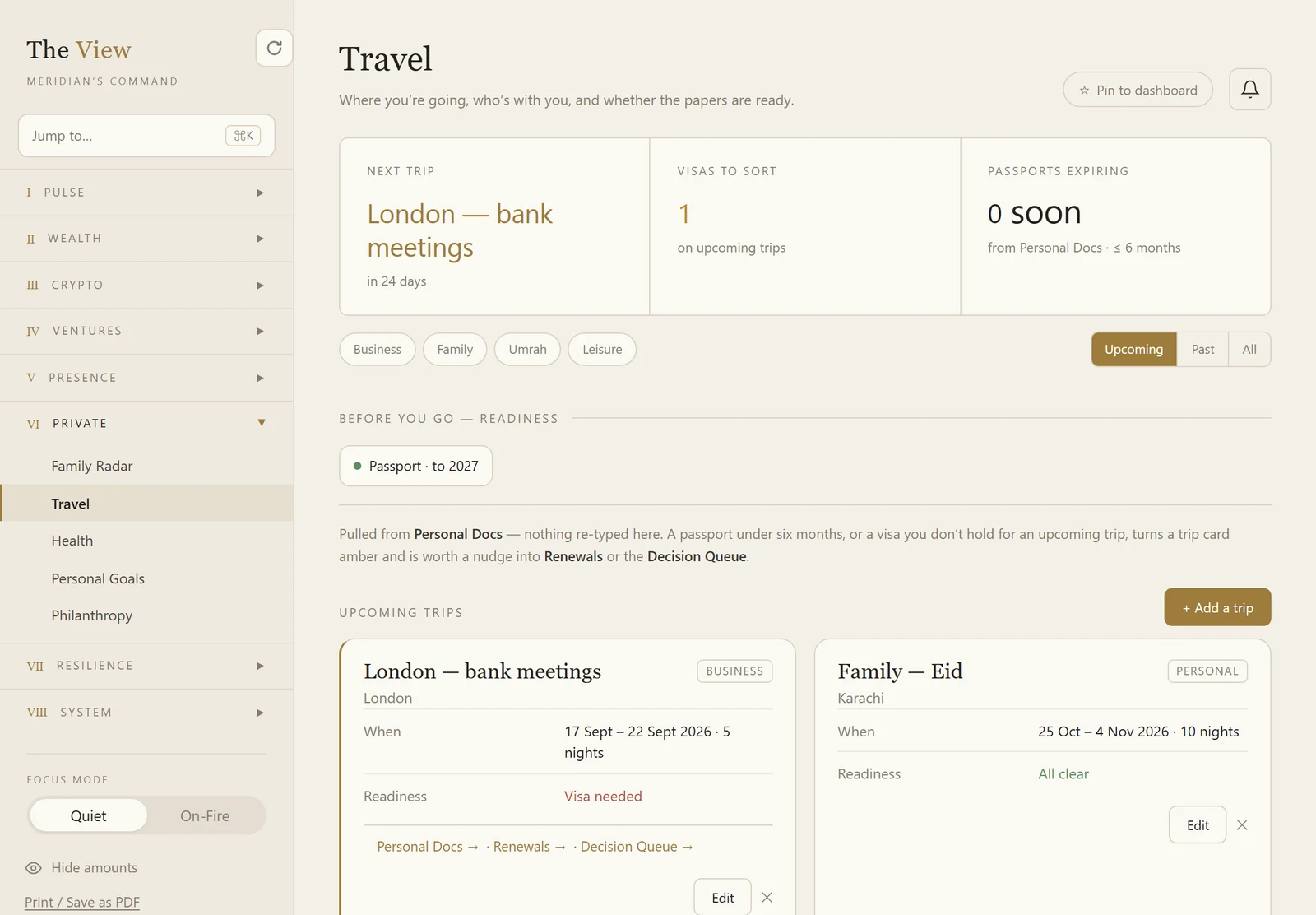
Each trip carries its own readiness. A visa you do not hold, or a passport with under six months on it, turns the trip amber — read from the documents you already gave it, never re-typed.

The View travel screen showing the next trip, visas to sort, and two upcoming trips, one flagged as needing a visa.
Tap to enlarge
07 — Continuity

If you step away, who holds what.

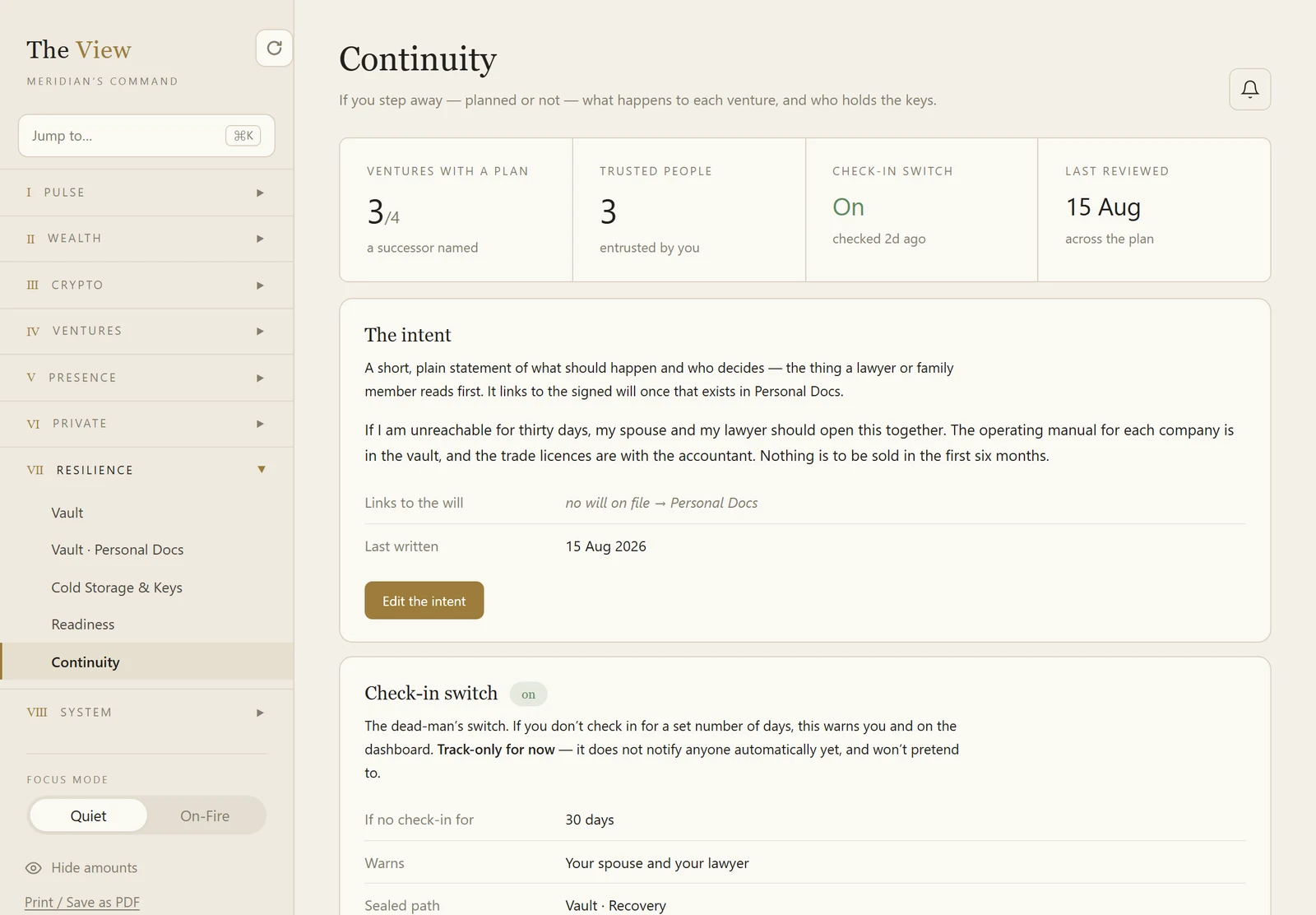
A named successor against each company, the people you have entrusted with something, and a plain statement of what should happen — the thing a lawyer or a family member reads first.

The View continuity screen showing ventures with a plan, trusted people, the check-in switch and the written intent.
Tap to enlarge
08 — The Docket

Say it out loud and it becomes a plan.

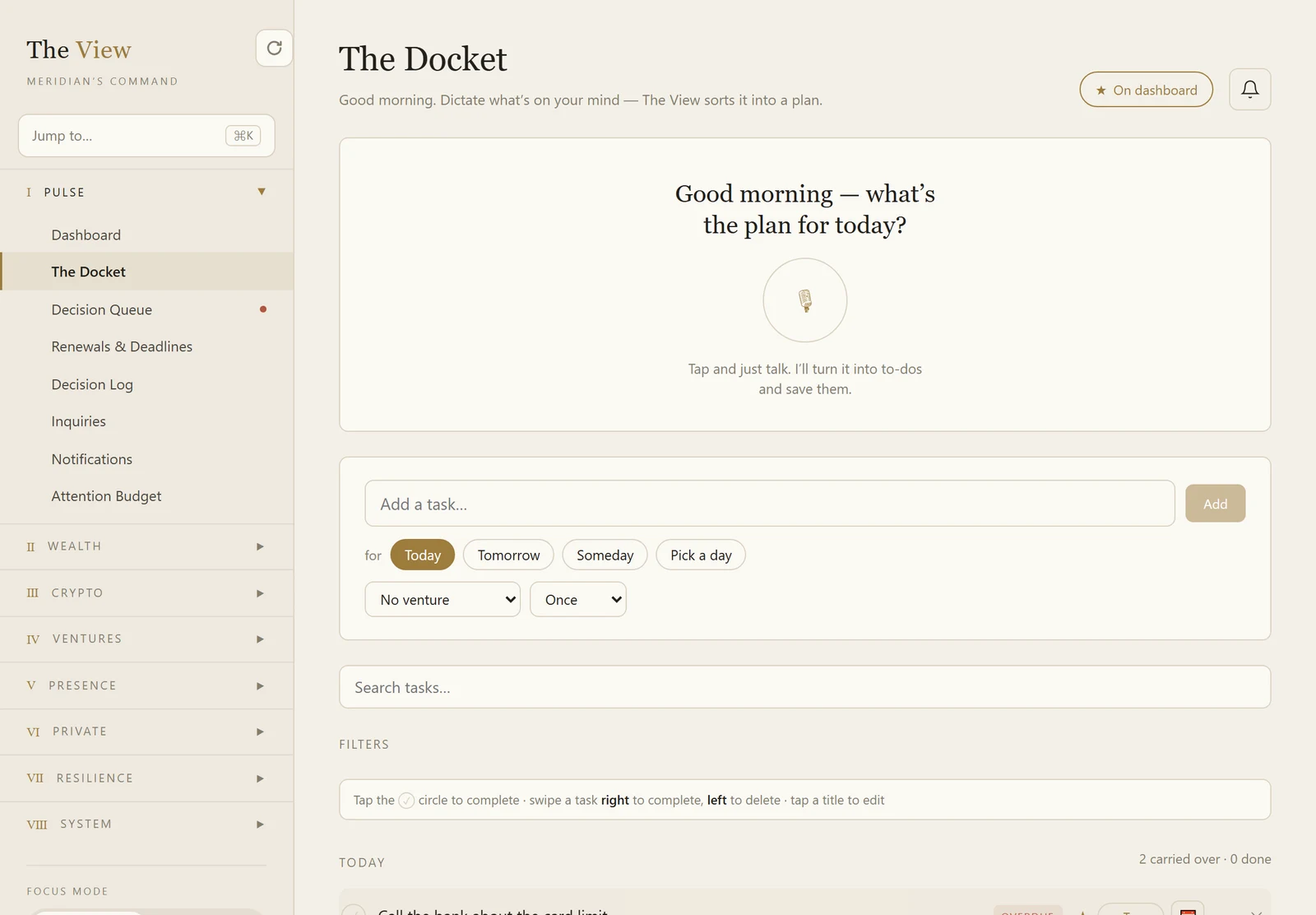
Press the microphone, talk, and what you said is sorted into today, this week, or someday. The one part of the system built for the ten seconds you have between two meetings.

The View Docket showing a voice capture panel above the day’s tasks and a seven-day week strip.
Tap to enlarge
Screens are from the live system. The figures belong to a fictional group of companies, not to a client.

Not another dashboard you stop opening.

You bought one of those before. It took months to fill in, it told you things you already knew, and you stopped looking. Here is what is different about this one, and none of it is a promise about the future — it is what the system does today.

01
Time

One number, instead of six logins

What can you actually spend today, across every company and every currency? Answering that now means the UAE bank, the Pakistani bank, the broker app, the accountant’s latest spreadsheet, and a conversion you do in your head. Here it is one figure on one page, in AED, USD and PKR at once.

Removes Rebuilding the same picture from scratch every time somebody asks you a question about it.

02
How it is presented

A date your cash runs out, not just a balance

A balance tells you what you have. This works out what leaves each month, how many months that leaves you, and the actual calendar date the money ends. Your accountant gives you a position; this gives you a deadline.

Removes Deciding on instinct how long you can carry something that is losing money.

03
How it is presented

It refuses to count a number it does not trust

A balance nobody has looked at for three weeks stops being counted, and it tells you why. It shows how old the exchange rates are. When a figure has not been checked against money that actually moved, it says so on the screen instead of quietly presenting it as fact.

Removes Confident totals built on figures that went stale months ago.

04
Getting data in

Photograph the statement. Do not type it

Excel, CSV, a PDF from the bank, or a photograph of a paper statement. It reads the document, pulls out the rows, and shows them to you to approve before a single one is saved. And it never asks for a banking login, because it never needs one.

Removes Evenings spent copying figures off a statement into a spreadsheet by hand.

05
Time

Nothing expires without warning you first

Every trade licence, visa, passport, tenancy and insurance you have given it, counted down in one list and pushed onto the opening page before it lands. The licence with eleven days left is on the screen the morning you log in.

Removes The Thursday afternoon scramble when something has already lapsed.

To answer “what can I spend today?” now
  1. Log in to the bank here
  2. Log in to the bank there
  3. Open the broker app
  4. Find the accountant’s latest file
  5. Convert the currency yourself
  6. Arrive at a figure you half trust
With The View
  1. Open one page

The figure is the same one every time, and it tells you how fresh it is.

What does it hold?

Eight areas. You use the ones that apply to you and ignore the rest — nothing is switched on that you did not ask for.

Today

Decisions waiting on your word, every renewal and deadline before it lands, and a to-do you dictate out loud instead of typing.

Money

What you hold, what you owe, what leaves each month and how long the rest lasts. Across banks, companies and currencies.

Investments

Holdings and positions across brokers, funds and exchanges — priced live where a price exists, and marked honestly where one does not.

Your companies

A page for each business you own, so the group picture is never a weekend of exports.

Property

Each asset: what it is worth, what is owed on it, what it earns, and what falls due next.

The personal half

Family, travel, health and what you give. Whose passport expires when, and the commitments that never appear on a balance sheet.

What survives you

An encrypted vault, your documents and their expiry dates, and a named successor for each business.

Your name online optional

If it matters to you: what your website earns in visits and search, and whether ChatGPT and the others name your business when someone asks for one like it. Most people leave this one off.

How does it compare to what you do now?

Against the two things you are almost certainly using already. We have not put a rival product in this table, because we would have to guess at its price to do it.

 Your spreadsheetYour accountant’s reportsThe View
How current it isWhen you last remembered to update itAfter each filing period, looking backwardsAs current as the last statement you uploaded
What it coversWhatever you put in itThe companies they file forCompanies, property, investments, documents, and the people around you
Tells you what falls dueNoNo — that is not what they are forYes, on the opening page before it lands
On your phoneTechnicallyNoInstalls to the home screen, Face ID
If you are not thereOnly you understand itThey hold their part, nobody holds the wholeA named successor per company, and an encrypted vault
What it costsNothing, and your eveningsPer filingAED 2,599 a year

What does it cost?

AED 2,599 a year

One private system, and one price for it. No charge per user, no tiers to choose between, and no upgrade you discover you needed later.

AED 159 an hour to build it

Setting up is real work done by a person: your companies, accounts, properties and documents put in by hand. We tell you how many hours it will take before we start, and you approve that figure — a small estate takes a few hours, a complicated one takes longer.

When you click

You tell us what you run, in a short form. We reply with what your system would hold and what setting it up involves. If it is not right for you, we say so.

A record you can take

Every section prints or saves as a PDF from the sidebar, so a full record of what the system holds is always yours to keep.

Three things worth being straight about.

Nothing connects to your bank

There is no bank feed, and we never ask for your banking login — not for your accounts here, not for the ones back home. Accounts are entered by hand when we set you up, and after that you keep them current by uploading a statement: Excel, CSV, PDF, or a photograph of it. The system reads it and shows you the rows before anything is saved. It is deliberately manual for now, we manage it with you, and we would rather tell you before you pay than after.

Who can see what

Your figures sit in your own database, not pooled with anyone else’s. During setup we see what you show us and nothing else. The vault has two tiers: anything you mark private is encrypted in your browser with a passphrase that never reaches us, so we could not open it if we were asked to.

It tells you — it does not do it for you

It will not file your returns, chase an invoice or ring your accountant. What it does is watch every date and figure you have given it, and put the ones that need you on the first page before they turn urgent. That is also the honest answer to why people abandon systems like this: one you have to remember to check is dead inside a month. This one opens by telling you what is due.

Questions people ask first.

If yours is not here, ask it in the form — it reaches a person, not a queue.

What am I actually buying?
A private web system, yours alone, that holds everything you own and everything with a date on it — companies, bank accounts, property, investments, documents, renewals, and the personal side around them. Instead of eight apps, a folder of PDFs and your own memory, there is one place to look — and one page that opens by telling you what needs you today.
Who is it for?
People who run more than one thing. If you own two or more companies, or a company plus property, or you are keeping the whole picture in your head and a spreadsheet, this is built for you. If you have one salary and one bank account, you do not need it — and we will tell you so.
Does it connect to my bank?
No — and it never asks for your banking login. There is no feed to any bank, here or anywhere else. Your accounts go in by hand when we set you up, and you keep the balances current by uploading a statement: Excel, CSV, PDF, or a photograph of it. The system reads it and shows you what it found before anything is saved. For now that is deliberate, and it means your banking credentials never leave your bank.
Who can see my figures?
Your figures sit in your own database, not pooled with anyone else’s. During setup we see what you show us and nothing else. The vault has two tiers: anything you mark private is encrypted in your browser with a passphrase that never reaches us, so we cannot open it even if you ask us to.
What do I have to do to set it up?
Tell us what you run. We build the structure with you — your companies, accounts, properties and documents — so you are not staring at an empty system wondering where to start. That is the setup work, charged at AED 159 an hour against a figure you agree first.
What does it cost, in total?
AED 2,599 a year for the system itself — one price, no charge per user, no tiers, and no upgrade you discover you needed later. Setting it up is charged separately at AED 159 an hour, because it is real work done by a person rather than a form you fill in. We count the hours your affairs will take and tell you that number before we begin, so you approve the setup cost in advance rather than discovering it on an invoice.
Does it work on my phone?
Yes, and there is nothing to install from a store. You open it once in your browser and add it to your home screen — on iPhone or Android — and after that it opens full screen, in portrait, like any other app. You can set it to unlock with Face ID or your fingerprint instead of typing a code.
Can I bring my spreadsheet, or do I retype everything?
You do not retype it. The system reads Excel files, CSV, PDF statements and photographs of statements, and shows you the rows it found so you can check them before anything is saved. The rest of the structure — your companies, accounts, properties and documents — goes in during setup, with us, not by you alone at a keyboard.
Can my accountant or my assistant log in?
A second login on the same system is possible. Limited access is not, yet — today a second person sees what you see, rather than one restricted corner of it. If you need someone confined to a single area, tell us before you start, because it is not there today and we would rather say so now.
Does it replace my accountant, or my accounting software?
No. Your accountant files; this tells you where you stand between filings. It does not plug into your accounting software and does not try to — the figures come from what you and we put in, and from the statements you upload.
How long before it is useful?
Days, not months. The structure goes in during setup and is useful immediately. After that it is as current as the last statement you uploaded — which for most people is a few minutes once a month, not an afternoon.
One private system. AED 2,599 a year.

Tell us what you run. We will tell you honestly whether this is worth it.

Start your system
Setup at AED 159 an hour, quoted and agreed before we start
See what else we have built
Last updated · prices and figures on this page are current as of that date.